Friday, February 1, 2013

Cara Ubah Copyright Footer Wordpress yang di Encrypt


Tutorial ini untuk para master wordpress saya rasa sudah usang, tetapi menurut saya, yang masih belajar wordpress juga banyak sekali, termasuk saya hehe :D, untuk itu saya rasa tidak ada salahnya kembali berbagi.

Disini saya akan berusaha menjelaskan se-detail mungkin cara mengedit footer yang di encrypt yang tampilannya hanya kode-kode huruf dan angka dengan jumlah ratusan dan jelas tidak akan bisa kita edit.

Cara menemukannya silahkan login wordpress anda ya..(dalam hal ini wordpress self hosting, atau wordpress org).

Silahkan anda klik menu Appearance -> Editor -> Footer (footer.php), atau ikuti sesuai gambar dibawah ini : (klik gambar untuk memperbesar)


Kira-kira apakah anda bisa mengeditnya..?, sangat susah sekali bukan :).

Lalu saatnya melalukan pengeditan. Masih di menu editor, klikMain Index Template (index.php) sesuai gambar. dalam beberapa themes wp lainnya namanya home.php.

Kemudian cari kode seperti yang saya lingkari di gambar, (letaknya di akhir kode).


Setelah ketemu rubah / sisipi kode seperti gambar dibawah ini :


Kenudian klik save (update file).

Langkah selanjutnya adalah buka alamat blog wordpress anda di browser (kalau sudah terbuka refresh aja).

Kemudaian ambil kode source dari blog anda, cara nya :

Untuk browser Internet Explorer caranya klik : View -> Source
Untuk browser Mozilla Firefox caranya klik : View -> Page Source

Atau anda bisa klik kanan di halaman kosong blog anda dan klik source, seperti gambar dibawah ini. Semua browser bisa pakai cara ini, saya sendiri menggunakan opera seperti yang digambar.


Pada halaman tab source code yang muncul, silahkan anda cari kode yang tadi kita beri pembatas dengan <!--–Awal kode footer–--> dan <!--–Akhir kode footer–-->

Dengan demikian akan mudah kita mencarinya. Untuk jelasnya seperti yang saya contohkan di bawah ini :

<!--–Awal kode footer–-->

disinilah kode footer yang nanti anda copy

<!--–Akhir kode footer–-->


Setelah anda menemukannya, lalu silahkan copy kode di antara baris <!--–Awal kode footer–--> dan <!--–Akhir kode footer–--> , Lalu paste kan pada file footer.php theme anda tadi. (sebelumnya anda hapus semua kode yang tak beraturan di dalam footer.php tadi). lalu save / update file.

Akhirnya, kini anda bisa mengedit footer.php anda dengan sesuka hati karena kode sudah berhasil anda ganti, anda bisa dengan mudah mengganti copyright seperti contoh gambar di bawah ini.


Itulah tadi pembahasan tentang cara mengganti copyright dari footer yang ter-encrypt melalui wordpress self hosting, selamat mencoba dan semoga bermanfaat.

Saturday, January 26, 2013

Cara membuat sitemap oxwall gratis

There are mainly two types of sitemaps: HTML sitemap and XML sitemap, and they are designed for dealing with different issues about websites. Therefore, before you start to learn How To Create Sitemap Without Pluging you need first know which type of sitemap suits your needs.

There are two ways to build sitemaps for your site: automatically or manually. Finding a trustworthy Free Sitemap Generator  to automatically build sitemaps is the easiest: and you can directly create sitemap for your site. Read More: xml-sitemaps.com or find the usefull service at: oxwall.org/store/user-list/plugin/Purusothaman

Here I Would Like to let u know how to create sitemap without plugin.

All you need is: 
-Download the free software (sitemapX) that came with this post into your computer and install.
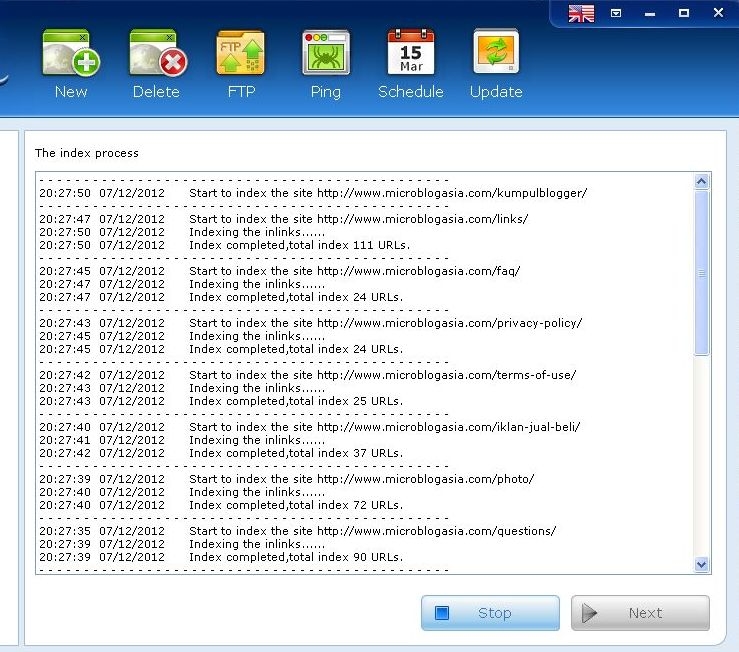
-give it a start URL of your oxwall site, and fill the required fields under the tab "Settings" and "FTP&PING"—click on "Crawl", 
-You can make this free software automatically crawl your site in up to one minute (no matter how large your site is)—after the crawling, click on "Next", 
-Then you will get a detailed report of the crawled pages (the metadata about each page also included), along with the error pages on your site—click on "Edit", you can make modifications to the metadata or delete some pages—click on "Generate", 
-Then you will find that Free Software  instantly accomplish website sitemap generation, sitemap upload, and even search engine pinging.
-Easy, isn't it? And you can even just set a schedule to make all this happen automatically and periodically, which can ensure that search engines will index your updated contents timely. 
See The Live Sample: 


And Change .htaccess

Options +FollowSymLinks
RewriteEngine On

AddEncoding gzip .gz
AddEncoding gzip .gzip
<FilesMatch "\.(js.gz|js.gzip)$">
  ForceType text/javascript
</FilesMatch>
<FilesMatch "\.(css.gz|css.gzip)$">
  ForceType text/css
</FilesMatch>

RewriteCond %{REQUEST_URI} .*/http-bind
RewriteRule (.*) /http-bind [L]

RewriteCond %{REQUEST_URI} !^/index\.php
RewriteCond %{REQUEST_URI} !/ow_updates/index\.php
RewriteCond %{REQUEST_URI} !/ow_updates/
RewriteCond %{REQUEST_URI} !/ow_cron/run\.php
RewriteCond %{REQUEST_URI} (/|\.php|\.html|\.htm|\.xml|\.feed|robots\.txt|\.raw|/[^.]*)$  [NC]
RewriteCond %{REQUEST_URI} !/sitemap\.xml|\.xml.gz|\.txt|\.xsl|\.html


RewriteRule (.*) index.php

HOW TO CREATE OXWALL SITEMAP WITHOUT PLUGIN

There are mainly two types of sitemaps: HTML sitemap and XML sitemap, and they are designed for dealing with different issues about websites. Therefore, before you start to learn How To Create Sitemap Without Pluging you need first know which type of sitemap suits your needs.

There are two ways to build sitemaps for your site: automatically or manually. Finding a trustworthy Free Sitemap Generator  to automatically build sitemaps is the easiest: and you can directly create sitemap for your site. Read More: xml-sitemaps.com or find the usefull service at: oxwall.org/store/user-list/plugin/Purusothaman

Here I Would Like to let u know how to create sitemap without plugin.

All you need is: 
-Download the free software (sitemapX) that came with this post into your computer and install.
-give it a start URL of your oxwall site, and fill the required fields under the tab "Settings" and "FTP&PING"—click on "Crawl", 
-You can make this free software automatically crawl your site in up to one minute (no matter how large your site is)—after the crawling, click on "Next", 
-Then you will get a detailed report of the crawled pages (the metadata about each page also included), along with the error pages on your site—click on "Edit", you can make modifications to the metadata or delete some pages—click on "Generate", 
-Then you will find that Free Software  instantly accomplish website sitemap generation, sitemap upload, and even search engine pinging.
-Easy, isn't it? And you can even just set a schedule to make all this happen automatically and periodically, which can ensure that search engines will index your updated contents timely. 


See The Live Sample: 


And Change .htaccess

Options +FollowSymLinks
RewriteEngine On

AddEncoding gzip .gz
AddEncoding gzip .gzip
<FilesMatch "\.(js.gz|js.gzip)$">
  ForceType text/javascript
</FilesMatch>
<FilesMatch "\.(css.gz|css.gzip)$">
  ForceType text/css
</FilesMatch>

RewriteCond %{REQUEST_URI} .*/http-bind
RewriteRule (.*) /http-bind [L]

RewriteCond %{REQUEST_URI} !^/index\.php
RewriteCond %{REQUEST_URI} !/ow_updates/index\.php
RewriteCond %{REQUEST_URI} !/ow_updates/
RewriteCond %{REQUEST_URI} !/ow_cron/run\.php
RewriteCond %{REQUEST_URI} (/|\.php|\.html|\.htm|\.xml|\.feed|robots\.txt|\.raw|/[^.]*)$  [NC]
RewriteCond %{REQUEST_URI} !/sitemap\.xml|\.xml.gz|\.txt|\.xsl|\.html


RewriteRule (.*) index.php